> For the complete documentation index, see [llms.txt](https://zessentials.groupez.dev/llms.txt). Markdown versions of documentation pages are available by appending `.md` to page URLs; this page is available as [Markdown](https://zessentials.groupez.dev/modules/economy.md).
# Economy
Manage the server economy
This module allows you to create multiple virtual economies. You can use Vault to link one of the economies to Vault.
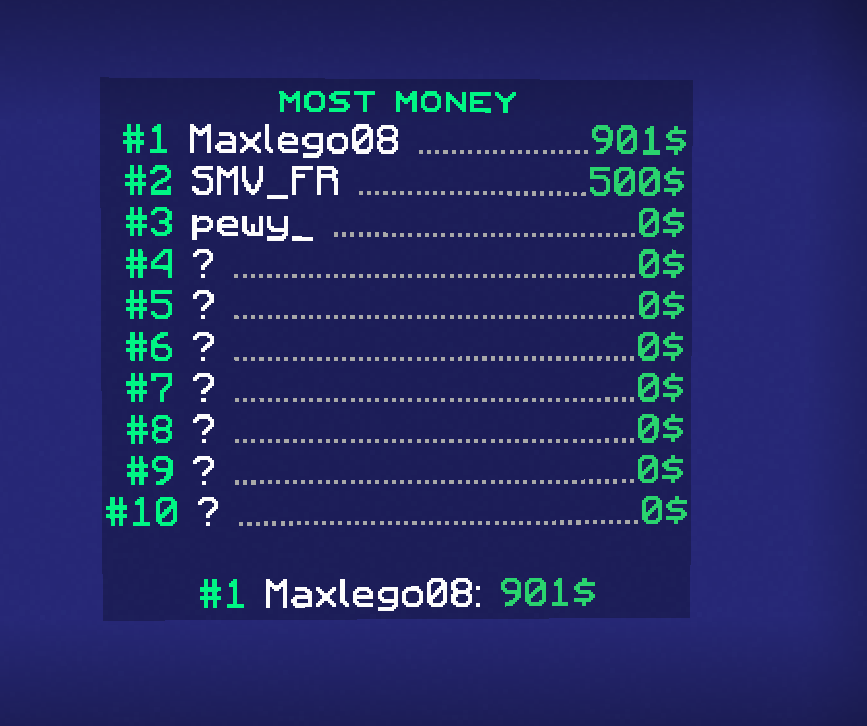
Baltop hologram
## Configuration
### Config.yml
{% code fullWidth="true" %}
```yaml
########################################################################################################################
#
# ███████╗░█████╗░░█████╗░███╗░░██╗░█████╗░███╗░░░███╗██╗░░░██╗
# ██╔════╝██╔══██╗██╔══██╗████╗░██║██╔══██╗████╗░████║╚██╗░██╔╝
# █████╗░░██║░░╚═╝██║░░██║██╔██╗██║██║░░██║██╔████╔██║░╚████╔╝░
# ██╔══╝░░██║░░██╗██║░░██║██║╚████║██║░░██║██║╚██╔╝██║░░╚██╔╝░░
# ███████╗╚█████╔╝╚█████╔╝██║░╚███║╚█████╔╝██║░╚═╝░██║░░░██║░░░
# ╚══════╝░╚════╝░░╚════╝░╚═╝░░╚══╝░╚════╝░╚═╝░░░░░╚═╝░░░╚═╝░░░
#
# Documentation: https://zessentials.groupez.dev/modules/economy
#
########################################################################################################################
enable: true
# The economy that will be used by default.
default-economy: "money"
# List of available economies
economies:
# Economy name
- name: money
# Economy display name. This name will be used to be displayed in player messages whenever possible.
display-name: Money
# Economy symbol
symbol: "$"
# Economy format
format: "%price%$"
# Should the economy be used for vault. Only one economy can work with vault.
vault: true
# The minimum number possible with this economy.
min: -99999999999999999999999999999999999999999999999999999999999999
# The maximum number possible with this economy.
max: 99999999999999999999999999999999999999999999999999999999999999
# The minimum number for /pay command
min-pay: 0.1
# The maximum number for /pay command
max-pay: 999999999999999
# Enable the ability to use /pay command with this economy
enable-pay: true
# Activate confirmation menu for /pay command. This menu will confirm that you really want to send money to the player
enable-confirm-inventory: true
# The minimum number to display the confirmation inventory, below the command will run directly
min-confirm-inventory: 10000000
# The format type of for numbers
price-format: PRICE_WITH_REDUCTION
# Economy name
- name: coins
# Economy display name. This name will be used to be displayed in player messages whenever possible.
display-name: Coins
# Economy symbol
symbol: "⛁"
# Economy format
format: "%price%⛁"
# Should the economy be used for vault. Only one economy can work with vault.
vault: false
# The minimum number possible with this economy.
min: 0
# The maximum number possible with this economy.
max: 9999999999999999999999999
# The minimum number for /pay command
min-pay: 0.1
# The maximum number for /pay command
max-pay: 1000
# Enable the ability to use /pay command with this economy
enable-pay: true
# Activate a confirmation menu for /pay command. This menu will confirm that you really want to send money to the player
enable-confirm-inventory: true
# The minimum number to display the confirmation inventory, below the command will run directly
min-confirm-inventory: 0
# The format type of for numbers
price-format: PRICE_RAW
# Set a number to use a format. For example, /pay Maxlego08 10k will become/pay Maxlego08 10000
# Allows to multiply a number very simply
number-format-sell-multiplication:
- format: k
multiplication: 1000
- format: m
multiplication: 1000000
- format: b
multiplication: 1000000000
- format: t
multiplication: 1000000000000
- format: q
multiplication: 1000000000000000
- format: qq
multiplication: 1000000000000000000
- format: s
multiplication: 1000000000000000000000
- format: ss
multiplication: 1000000000000000000000000
- format: o
multiplication: 1000000000000000000000000000
- format: n
multiplication: 1000000000000000000000000000000
- format: d
multiplication: 1000000000000000000000000000000000
- format: uu
multiplication: 1000000000000000000000000000000000000
- format: dd
multiplication: 1000000000000000000000000000000000000000
- format: tr
multiplication: 1000000000000000000000000000000000000000000
# Price format available
# - PRICE_RAW - Display the number without any changes
# - PRICE_WITH_DECIMAL_FORMAT - Display the number with the price-decimal-format configuration
# - PRICE_WITH_REDUCTION - Display the number with the price-reduction configuration
price-format: PRICE_WITH_REDUCTION
price-decimal-format: '#,###.#'
# Documentation for String format: https://www.geeksforgeeks.org/java-string-format-method-with-examples/
price-reductions:
- format: "#.#" # Blank format to display text directly
maxAmount: 1000
# Add colors to text display, works with MiniMessage
display: "#2bd66f%amount%"
- format: "%.1fK"
maxAmount: 1000000
display: "#a3d14d%amount%"
- format: "%.1fM"
maxAmount: 1000000000
display: "#ebbc23%amount%"
- format: "%.1fB"
maxAmount: 1000000000000
display: "#eb4b23%amount%"
- format: "%.2fT"
maxAmount: 1000000000000000
display: "#ff9999%amount%"
- format: "%.2fQ"
maxAmount: 100000000000000000
display: "#ff3535%amount%"
# Baltop
# Enable or disable baltop
enable-baltop: true
# Time in seconds for baltop to update
baltop-refresh-seconds: 900
# Default value if a player does not exist for a position
baltop-placeholder-user-empty: "?"
# How to display baltop with/baltop command
# MESSAGE - Send a message
# INVENTORY - Open an inventory
baltop-display: MESSAGE
# Economy used to be displayed in baltop
baltop-message-economy: money
# Number of players to display in the message
baltop-message-amount: 10
# Allows players to cache their money offline.
# If you want to have a baltop system with all your players you must activate this option
store-offline-player-money: false
```
{% endcode %}
### Confirm Pay Inventory
{% code fullWidth="true" %}
```yaml
name: '#3f3f3fᴄᴏɴꜰɪʀᴍ'
size: 27
items:
cancel:
slot: 10
closeInventory: true
item:
material: RED_STAINED_GLASS_PANE
name: '#ff0000ᴄᴀɴᴄᴇʟ'
lore:
- '&7Click to cancel the payment'
head:
slot: 13
item:
playerHead: '%zessentials_user_target_player_name%'
name: '#99E0FF%zessentials_user_target_player_name%'
lore:
- '&7Amount&8: #99E0FF%zessentials_user_target_pay_amount%'
confirm:
type: ZESSENTIALS_PAY_CONFIRM
slot: 16
closeInventory: true
item:
material: GREEN_STAINED_GLASS_PANE
name: '#00ff00ᴄᴏɴғɪʀᴍ'
lore:
- '&7Click to send &n%zessentials_user_target_player_name%&r &7payment of #99E0FF%zessentials_user_target_pay_amount%'
```
{% endcode %}
### Baltop Inventory
{% code fullWidth="true" %}
```yaml
name: "#00f986ᴍᴏsᴛ ᴍᴏɴᴇʏ"
size: 36
items:
first:
slot: 13
item:
playerHead: "%zessentials_economy_baltop_name_money_1%"
name: "#00f986#1 &f%zessentials_economy_baltop_name_money_1%: %zessentials_economy_baltop_formatted_amount_money_1%"
second:
slot: 21
item:
playerHead: "%zessentials_economy_baltop_name_money_2%"
name: "#00f986#2 &f%zessentials_economy_baltop_name_money_2%: %zessentials_economy_baltop_formatted_amount_money_2%"
third:
slot: 23
item:
playerHead: "%zessentials_economy_baltop_name_money_3%"
name: "#00f986#3 &f%zessentials_economy_baltop_name_money_3%: %zessentials_economy_baltop_formatted_amount_money_3%"
```
{% endcode %}